![[Compaq]](../../images/hp.gif)
![[Go to the documentation home page]](../../images/buttons/hp_bn_site_home.gif)
![[How to order documentation]](../../images/buttons/hp_bn_order_docs.gif)
![[Help on this site]](../../images/buttons/hp_bn_site_help.gif)
![[How to contact us]](../../images/buttons/hp_bn_comments.gif)
![[OpenVMS documentation]](../../images/hp_ovmsdoc_sec_head.gif)
| Document revision date: 15 July 2002 | |
|
|
|
|
|
|
| Previous | Contents | Index |
On VAX systems, the RX02 disk is a mass storage device that uses removable diskettes. The RX02 supports existing single-density, RX01-compatible diskettes. A double-density mode allows diskettes to be recorded at twice the linear density. An entire diskette must be formatted in either single or double density. Mixed mode diskettes are not allowed.
The RX02 is connected to the system by an RX211 controller that interfaces with the UNIBUS adapter. Up to two disk drives can be controlled by each RX211.
For logical and virtual block I/O operations, data is accessed with single block resolution (four single-density sectors or two double-density sectors). The sector numbers are interleaved to expedite data transfers. Section 2.2.10 describes this feature in greater detail.
For physical block I/O operations, the track and sector parameters
shown in Figure 2-1 describe a physical sector (128 bytes in single
density; 256 bytes in double density). The driver does not apply
track-to-track skew, cylinder offset, or sector interleaving to the
physical medium address.
2.1.22 RX23 (VAX Only)
On VAX systems, the RX23 device is a 1-inch high, flexible diskette drive that uses 3.5-inch microfloppy diskettes. The RX23 drive can access standard- and high-density media. The following table summarizes capacities for standard- and high-density media:
| Density | Unformatted | Formatted |
|---|---|---|
| Standard | 1.0 MB | 700 KB |
| High | 2.0 MB | 1.4 MB |
The RX23 is backward compatible in that it can read 1-MB media. It can also read and write 2.0-MB double-sided, high-density (135 tracks per inch) media.
The RX23 communicates with the controller using the ST506 fixed-disk
interconnect (FDI).
2.1.23 RX33 (VAX Only)
On VAX systems, the RX33 is a 1.2-MB, 5.25-inch, half-height diskette drive. The RX33 can record in either standard- or high-density mode. High-density mode provides 1.2 MB of storage using 96 tracks per inch using double-sided, high-density diskettes.
In standard-density mode, the RX33 drive is read- and write-compatible
with single-sided, standard-density RX50 diskettes.
2.1.24 RX50 (VAX Only)
On VAX systems, the RX50 dual-diskette drive stores data in
fixed-length blocks on 5.25-inch 0.8-MB, flexible diskettes using
preformatted headers. The RX50 can accommodate two diskettes
simultaneously.
2.1.25 RZ22, RZ23, and RZ55 Disks
The RZ22 and RZ23 are 3.5-inch, half-height SCSI drives with an average seek rate of 33 ms and an average data transfer rate of 1.25 MB per second. The RZ22 and RZ23 have capacities of 52 MB and 104 MB, respectively.
The RZ55 is a 332-MB, 5.25-inch, full-height SCSI drive with an average
access rate of 24 ms.
2.1.26 TU58 Magnetic Tape (DECtape II)
The TU58 is a random-access, mass storage magnetic tape device capable of reading and writing 256K bytes per drive of data on block-addressable, preformatted cartridges at 800 bits per inch. Unlike conventional magnetic tape systems, which store information at variable positions on the tape, the TU58 stores information at fixed positions on the tape, as do magnetic disk or floppy disk devices. Therefore, blocks of data can be placed on tape in a random fashion, without disturbing previously recorded data. In its physical geometry, the tape is conceptually viewed as having one cylinder, four tracks per cylinder, and 128 sectors per track. Each sector contains one 512-byte block.
The TU58 uses two vectors. NUMVEC=2 is required on the CONNECT command when specifying system parameters.
The TU58 interfaces with the UNIBUS adapter through a DL11-series
interface device. Both the TU58 and the DL11 should be set to 9600
baud. (Because the TU58 is attached to a DL11, the user cannot directly
access the TU58 registers if the TU58 is on the UNIBUS.) The TU58,
which has its own controller, can access either one or two tape drives.
2.2 Driver Features
Disk drivers provide the following features:
The following sections describe these features in greater detail.
2.2.1 Dual-Pathed Disks
A dual-pathed disk is a dual-ported disk that is accessible to all the CPUs in the cluster, not just to the CPUs that are connected physically to the disk. Dual-pathed disks can be any of the following:
The term dual-pathed refers to the two paths through which clustered
CPUs can access a disk to which they are not directly connected. If one
path fails, the disk is accessed over the other path. (Note that with a
dual-ported MASSBUS disk, a CPU directly connected to the disk always
accesses it locally.)
2.2.2 Dual Porting MASSBUS Disks
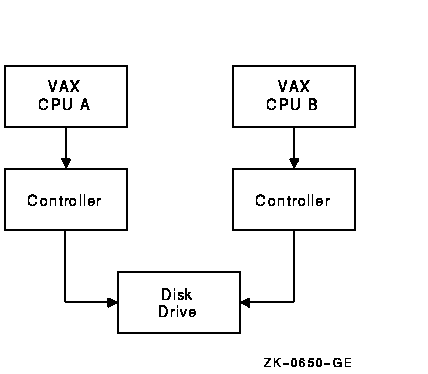
The MASSBUS disk drivers, DBDRIVER and DRDRIVER, support static dual porting. Dual porting allows two MASSBUS controllers to access the same disk drive. Figure 2-2 shows this configuration. The RP05, RP06, RP07, RM03, RM05, and RM80 disk drives can be ordered, or upgraded in the field, with the MASSBUS dual-port option.
Figure 2-2 Dual-Ported Disk Drives
The port select switches, on each disk drive, select the ports from which the drive can be accessed. A drive can be in one of the following access modes:
The operational condition of the drive cannot be changed with the port select switches after the drive becomes ready. To change from one mode to another, the drive must be in a nonrotating condition. After the new mode selection has been made, the drive must be restarted.
If a drive is in the neutral state and a disk controller either reads
or writes to a drive register, the drive immediately connects a port to
the requesting controller. For read operations, the drive remains
connected for the duration of the operation. For write operations, the
drive remains connected until a release command is issued by the device
driver or a 1-second timeout occurs. After the connected port is
released from its controller, the drive checks the other port's request
flag to determine whether there has been a request on that port. If no
request is pending, the drive returns to the neutral state.
2.2.2.2 Disk Use and Restrictions
If the volume is mounted foreign, read/write operations can be performed at both ports provided the user maintains control of where information is stored on the disk.
The Autoconfigure utility currently may not be able to locate the
nonactive port. For example, if a dual-ported disk drive is connected
and responding at Port A, the CPU attached to Port B might not be able
to find Port B with the Autoconfigure utility. If this problem occurs,
execute the AUTOCONFIGURE ALL/LOG command after the system is running.
2.2.2.3 Restriction on Dual-Ported Non-DSA Disks in a Cluster
Do not use SYSGEN to AUTOCONFIGURE or CONFIGURE a dual-ported, non-DSA disk that is already available on the system through use of an MSCP server. Establishing a local connection to the disk when a remote path is already known creates two uncoordinated paths to the same disk. Use of these two paths may corrupt files and data on any volume mounted on the drive.
If the disk is not dual-ported or is never served by an MSCP server on the remote host, this restriction does not apply. |
In a cluster, dual-ported non-DSA disks (MASSBUS or UNIBUS) can be connected between two nodes of the cluster. These disks can also be made available to the rest of the cluster using the MSCP server on either or both of the hosts to which a disk is connected.
If the local path to the disk is not found during the bootstrap, then the MSCP server path from the other host will be the only available access to the drive. The local path will not be found during a boot if any of the following conditions exist:
Use of the disk is still possible through the MSCP server path.
After the configuration of the disk has reached this state, it is important not to add the local path back into the system I/O database. Because the operating system does not provide an automatic method for adding this local path, the only possible way that you can add this local path is to use the System Generation utility (SYSGEN) qualifiers AUTOCONFIGURE or CONFIGURE to configure the device. SYSGEN is currently not able to detect the presence of the disk's MSCP path, and will incorrectly build a second set of data structures to describe it. Subsequent events could lead to incompatible and uncoordinated file operations, which might corrupt the volume.
To recover the local path to the disk, it is necessary to reboot the
system connected to that local path.
2.2.3 Dual-Pathed DSA Disks
A dual-ported DSA disk can be failed over between the two CPUs that serve it to the cluster under the following conditions: (1) the same disk controller letter and allocation class are specified on both CPUs and (2) both CPUs are running the MSCP server.
Failure to observe these requirements can endanger data integrity. |
However, because a DSA disk can be on line to only one controller at a time, only one of the CPUs can use its local connection to the disk. The second CPU accesses the disk through the MSCP server. If the CPU that is currently serving the disk fails, the other CPU detects the failure and fails the disk over to its local connection. The disk is thereby made available to the cluster once more.
A dual-ported DSA disk may not be used as a system disk. |
By design, HSC disks are cluster accessible; therefore, if they are dual-ported, they are automatically dual-pathed. CI-connected CPUs can access a dual-pathed HSC disk by way of a path through either HSC-connected device.
For each dual-ported HSC disk, you can control failover to a specific port using the port select buttons on the front of each drive. By pressing either port select button (A or B) on a particular drive, you can cause the device failover to the specified port.
With the port select button, you can select alternate ports to balance the disk controller workload between two HSC subsystems. For example, you could set half of your disks to use port A and set the other half to use port B.
The port select buttons also allow you to fail over all the disks to an
alternate port manually when you anticipate the shutdown of one of the
HSC subsystems.
2.2.5 Dual-Pathed RF-Series Disks
In a dual-path configuration of MicroVAX 3300/3400 CPUs or MicroVAX 3800/3900 CPUs using RF-series disks, CPUs have concurrent access to any disk on the DSSI bus. A single disk is accessed through two paths and can be served to all satellites by either CPU.
If either CPU fails, satellites can access their disks through the remaining CPU. Note that failover occurs in the following situations: (1) when the DSSI bus is connected between SII integral adapters on both MicroVAX 3300/3400 CPUs or (2) when the DSSI bus is connected between the KFQSA adapters on pairs of MicroVAX 3300/3400s or pairs of MicroVAX 3800/3900s.
The DSSI bus should not be connected between a KFQSA adapter on one CPU and an SII integral adapter on another. |
A data check is made after successful completion of a read or write operation and, except for the TU58, compares the data in memory with the data on disk to make sure they match.
Disk drivers support data checks at the following levels:
Offset recovery is performed during a data check, but error code correction (ECC) is not performed (see Section 2.2.9). For example, if a read operation is performed and an ECC correction is applied, the data check would fail even though the data in memory is correct. In this case, the driver returns a status code indicating that the operation was completed successfully, but the data check could not be performed because of an ECC correction.
Data checks on read operations are extremely rare, and you can either accept the data as is, treat the ECC correction as an error, or accept the data but immediately move it to another area on the disk volume.
A data check operation directed to a TU58 does not compare the data in
memory
with the data on tape. Instead, either a read check or a write check
operation is performed (see Sections 2.4.1 and 2.4.2).
2.2.7 Effects of a Failure During an I/O Write Operation
The operating system ensures that when an I/O write operation returns a successful completion status, the data is available on the disk or tape media. Applications that must guarantee the successful completion of a write operation can verify that the data is on the media by specifying the data check function modifier IO$M_DATACHECK. Note that the IO$M_DATACHECK data check function, which compares the data in memory with the data on disk, affects performance because the function incurs the overhead of an additional read operation to the media.
If a system failure occurs while a multiple-block write operation is in progress, the operating system does not guarantee the successful completion of the write operation. (OpenVMS does guarantee single-block write operations to DSA drives.) When a failure interrupts a write operation, the data may be left in any one of the following conditions:
To guarantee that a write operation either finishes successfully or (in the event of failure) is redone or rolled back as if it were never started, use additional techniques to ensure data correctness and recovery. For example, using database journaling and recovery techniques allows applications to recover automatically from failures such as the following:
A seek operation involves moving the disk read/write heads to a specific place on the disk without any transfer of data. All transfer functions, including data checks, are preceded by an implicit seek operation (except when the seek is inhibited by the physical I/O function modifier IO$M_INHSEEK). Seek operations can be overlapped except on RL02, RX01, RX02, TU58 drives, MicroVAX 2000, VAXstation 2000, or on controllers with diskettes (for example, RQDX3) when the disk is executing I/O requests. That is, when one drive performs a seek operation, any number of other drives can also perform seek operations.
During the seek operation, the controller is free to perform transfers on other units. Therefore, seek operations can also overlap data transfer operations. For example, at any one time, seven seeks and one data transfer could be in progress on a single controller.
This overlapping is possible because, unlike I/O transfers, seek operations do not require the controller once they are initiated. Therefore, seeks are initiated before I/O transfers and other functions that require the controller for extended periods.
All DSA controllers perform extensive seek optimization functions as
part of their operation; IO$M_INHSEEK has no effect on these
controllers.
2.2.9 Error Recovery
Error recovery in the operating system is aimed at performing all possible operations to complete an I/O operation successfully. Error recovery operations fall into the following categories:
The error recovery algorithm uses a combination of these four types of error recovery operations to complete an I/O operation:
Skip sectoring is a bad block treatment technique implemented on R80 disk drives (the RB80 and RM80 drives). In each track of 32 sectors, one sector is reserved for bad block replacement. Consequently, an R80 drive has available only 31 sectors per track. The Get Device/Volume Information ($GETDVI) system service returns this value.
You can detect bad blocks when a disk is formatted. Most formatters place these blocks in a bad block file. On an R80 drive, the first bad block encountered on a track is designated as a skip sector. This is accomplished by setting a flag in the sector header on the disk and placing the block in the skip sector file.
When a skip sector is encountered during a data transfer, it is skipped over, and all remaining blocks in the track are shifted by one physical block. For example, if block number 10 is a skip sector, and a transfer request was made beginning at block 8 for four blocks, then blocks 8, 9, 11, and 12 will be transferred. Block 10 will be skipped.
Because skip sectors are implemented at the device driver level, they are not visible to you. The device appears to have 31 contiguous sectors per track. Sector 32 is not directly addressable, although it is accessed if a skip sector is present on the track.
| Previous | Next | Contents | Index |
|
|
| privacy and legal statement | ||
| 6136PRO_006.HTML | ||