$ Type SYS$MANAGER:DCOM$EVENTLOG.RPT (1) ERROR : Tue Sep 15 11:18:54 1998 Unable to start a DCOM Server: {5E9DDEC7-5767-11CF-BEAB-00AA006C3606} Runas (null)/SMITH The Windows NT error: 1326 Happened while starting: device:[account]SSERVER.EXE (2) ERROR : Tue Sep 15 19:14:45 1998 The server {0C092C21-882C-11CF-A6BB-0080C7B2D682} did not register with DCOM within the required timeout. |
- The system logged the first error event on
Tue Sep 15 11:18:54 1998. The COM server (DCOM$RPCSS) was
unable to start the COM application
device:[account]SSERVER.EXE on behalf of the
client running under the SMITH account. (The client may have
received an error such as access denied). The resulting Windows NT
error was 1326, which translates as "Logon failure:
unknown user name or bad password."
If you received this error, you should check the validity of the user account using the Authorize utility (AUTHORIZE). - The system logged the second error event on
Tue Sep 15 19:14:45 1998. The COM server (DCOM$RPCSS) was able
to start the COM application
{0C092C21-882C-11CF-A6BB-0080C7B2D682}, but the application
did not run successfully. The time required by the application to
register with DCOM$RPCSS expired. (The client may have received an
error such as "Server execution failed"
CO_E_SERVER_EXEC_FAILURE).
If you received this error, you should run the server application interactively to determine its integrity.
1.1.13 Granting COM Application Access to the OpenVMS Registry
Because COM Version 1.0 for OpenVMS does not include NTLM security support, you must
grant COM applications access to the OpenVMS Registry by other means. For
applications that require Read access, granting the
REG$LOOKUP identifier is sufficient. For applications that
require Read and Write access (either
during development or at run time), you must grant the
REG$UPDATE identifier or the SYSPRV privilege.
1.1.14 DCOM$CNFG Utility and Disabling Applications: Possible Unintended Side Effects
The COM for OpenVMS DCOM$CNFG utility includes several options that allow a developer to modify application properties (for example, changing the location of the computer on which an application can run). If you select one of these options, you are modifying an OpenVMS Registry entry.
Because the OpenVMS Registry supports a single database in a cluster, modifying one of these options affects all nodes in the cluster that are running COM for OpenVMS.
For example, if you use the System-wide Default Properties
submenu Option 1 to disable COM for OpenVMS, you effectively disable
COM for OpenVMS on the entire cluster. In the same way, if you use the
Application Location submenu Option 1 to prevent an
application from running on this computer, you effectively prevent the
application from running on any computer in the cluster.
1.1.15 Threading Model Supported by COM for OpenVMS
COM Version 1.0 for OpenVMS supports only the multithreaded apartment (MTA, also known as free threads) model for application servers. The multithreaded apartment model allows a component to have more than one thread. However, you must ensure that your code is thread safe.
The threading model initialization call is as follows:
CoInitializeEx( NULL, COINIT_MULTITHREADED ) |
Because CoInitialize() implies the single-threaded apartment
(STA) model, you cannot use it in place of CoInitializeEx() in
a server application.
1.1.16 RPC Cannot Support Failure (800706E4)
A return status of (800706E4) from some COM APIs may indicate
that you are attempting to use the single-threaded apartment (STA)
model. This model is not supported in COM Version 1.0 for OpenVMS. For more
information, see Section 1.1.15.
1.1.17 Client Application May ACCVIO After Multiple Rundowns
An ACCVIO error may occur after running the Dispatch Sample1 application many (more than 20) times. The error appears after the client runs down and exits the main routine. The system displays the following message:
%SYSTEM-F-ACCVIO, access violation, reason mask=00, virtual address=
    0000000000000003, PC=0000000000311600, PS=0000001B
|
This error does not affect the application outcome.
Chapter 2
OpenVMS Registry Release Notes
2.1 Release Notes
The information in the following sections apply to the current
OpenVMS Registry release.
2.1.1 Database Quota Restrictions Result in Irreversible Create Key Failures
The OpenVMS Registry server may return failures on functions that create keys after it reaches the quota limit. These failures result from restrictions in the size of individual OpenVMS Registry database files or on the set of OpenVMS Registry database files. This condition will persist even after you reduce the resources in use to below the quota limit. When this error condition occurs, the OpenVMS Registry server displays the following error:
%REG-F-DBACCESS, cannot access registry database object |
The OpenVMS Registry Default File Quota parameter determines the quota applied to all OpenVMS Registry database files. By default, this quota is set to 268,435,456 bytes.
To resolve this problem, use the following command to set the Default File Quota to its maximum value:
$ mcr reg$cp modify value hkey_local_machine\system\registry - _$ /name="Default File Quota"/data=%X3FFFFFFF/type=dword |
In this example, the Default File Quota is increased to the maximum possible value, effectively disabling quotas.
You can also assign quota to individual database files (SYS$REGISTRY:REGISTRY$LOCAL_MACHINE.REG, SYS$REGISTRY:REGISTRY$USERS.REG, or user-defined database files).
To set a quota on an individual file, use a command such as the following:
$ mcr reg$cp create value/name=REGISTRY$LOCAL_MACHINE/type=dword - _$ /data=%D1000000 "hkey_local_machine\system\registry\File Quotas" |
In this example, the quota on the REGISTRY$LOCAL_MACHINE
database file is set to 1 MB.
2.1.2 No Key Change Notifications When a Key's Attributes are Modified
When you specify the REG$M_CHANGEATTRIBUTES value for the REG$_NOTIFYFILTER item code, the system should notify you of any changes to that OpenVMS Registry key. However, when you modify the attributes of a OpenVMS Registry key, the system fails to notify the processes that have requested notifications.
To correct this problem, specify a different value for the
REG$_NOTIFYFILTER item code: use either
REG$M_CHANGENAME or REG$M_CHANGELASTSET.
2.1.3 Error Specifying a Value with a Data Type of "NONE"
The system displays a REG$_INVDATATYPE error when you specify a data buffer on calls to the $REGISTRY service if the data type is REG$K_NONE.
To correct this error, do either of the following:
- Always specify a null pointer for the REG$_VALUEDATA item code when you specify the REG$_DATATYPE item code as REG$K_NONE.
- Always specify the REG$_DATATYPE as one of the following:
- REG$K_BINARY
- REG$K_DWORD
- REG$K_EXPAND_SZ
- REG$K_MULTI_SZ
- REG$K_QWORD
- REG$K_SZ
2.1.4 SYS$REGISTRY Logical Must be Defined
Because the system cannot choose a default value of SYS$REGISTRY in a cluster, the system manager must define the SYS$REGISTRY logical. SYS$REGISTRY must be defined as a systemwide logical (/SYSTEM) and must point to the same device and directory on every node that will run the OpenVMS Registry server in a cluster. You do not have to define SYS$REGISTRY on nodes that will run only OpenVMS Registry clients.
If you do not define SYS$REGISTRY on a node running the OpenVMS Registry server, or if you define SYS$REGISTRY to point to an invalid device or directory, the system writes the following message to the OpenVMS Registry server log file on that node (SYS$MANAGER:REGISTRY$SERVER.LOG):
%RMS-F-DEV, error in device name or inappropriate device type for operation |
This message will be made more specific in a future release of the OpenVMS Registry.
For additional information on how to configure the OpenVMS Registry
server, see Chapter 8. You should also review the contents of the
SYS$MANAGER:SYLOGICALS.TEMPLATE file.
2.1.5 Unavailability of OpenVMS Registry Server Results in Timeout Error
If the OpenVMS Registry server process is not executing on any node in the cluster, or if the OpenVMS Registry server process is unable to respond to a request, the system displays the following message:
%SYSTEM-F-TIMEOUT, device timeout |
This message will be made more specific in a future release of the OpenVMS Registry.
To avoid this error, verify that the OpenVMS Registry server process is
running on at least one node in the cluster.
2.1.6 Database Searches Limited
The REG$CP server management utility SEARCH command and calls to the $REGISTRY system service using the REG$FC_SEARCH_TREE_DATA, REG$FC_SEARCH_TREE_KEY, or REG$FC_SEARCH_TREE_VALUE function codes may result in more data being returned to the client than the communications buffers on the client node can handle. These functions are limited to paths that are no more that 16 levels deep and return data of no more than 4 KB.
To avoid this problem, limit the search depth by specifying an exact
path---that is, avoid searching the entire database when the database
is large.
2.1.7 OpenVMS Registry Databases Created by Field Test Versions
With the OpenVMS Version 7.2 release, Compaq has changed the security settings on some OpenVMS Registry keys. As a result, you must delete any existing OpenVMS Registry databases that you created with OpenVMS Registry field test versions. If you do not delete the older OpenVMS Registry databases, the current OpenVMS Registry server can access violate.
Use the following procedure to migrate your keys and values from an existing OpenVMS Registry database:
- Shut down all OpenVMS Registry server processes running on your system or cluster. For information about OpenVMS Registry shutdown, see Section 8.4.
- Back up all the files in the directory defined by the SYS$REGISTRY logical name.
- Delete all the files in the directory defined by the SYS$REGISTRY logical name.
- Restart the OpenVMS Registry on your system. Use the SYS$STARTUP:REG$STARTUP procedure; this procedure automatically creates a new OpenVMS Registry database. For more information in restarting the OpenVMS Registry, see Section 8.3.3.
- Repopulate the OpenVMS Registry database with the information contained in the field test version of the database. For example, if you are using Advanced Server for OpenVMS, execute the SYS$UPDATE:PWRK$CONFIG command procedure.
2.1.8 %REG-E-NOMSG Error Messages
OpenVMS Registry error messages are not a part of the system message files. If you create an image that makes SYS$REGISTRY calls, and that image is not linked with the OpenVMS Registry's shareable message file, the system might display a %REG-E-NOMSG error message. Under certain conditions, you can also see this this message at the DCL level.
To link your image with the OpenVMS Registry shareable message file, include it as a link option. The following example shows how to link to the OpenVMS Registry shareable message file.
$ LINK OBJECT1, OBJECT2, - SYS$INPUT:/OPTIONS SYS$LIBRARY:REG$MSGSHR/SHARE |
To be sure that the system translates OpenVMS Registry messages correctly at the DCL level, enter the following command to supplement the system message file:
$ SET MESSAGE SYS$LIBRARY:REG$MSGSHR |
2.1.9 Notification Failure During OpenVMS Registry Restart or Failover
The current release of the OpenVMS Registry does not carry over
notification requests after an OpenVMS Registry restart or during an
OpenVMS Registry failover operation. This feature will be added in a
future release of the OpenVMS Registry.
2.1.10 List Key Command Terminates on ACCESSDENIED Status
If the user's access permissions do not match a subkey's security setting, the OpenVMS Registry server management List Key command terminates prematurely with a %REG-E-ACCESSDENIED, requested access is denied error. In some cases, there may be additional subkeys that the user should be able to read.
For example, suppose an OpenVMS Registry key has the following structure:
Test_Key Test_Subkey_1 Test_Subkey_2 Test_Subkey_3 Test_Subkey_4 Test_Subkey_5 Test_Subkey_6 |
If someone modifies the security on Test_Subkey_3 so that a
user does not have Read access to that subkey, the
OpenVMS Registry server management List Key command
displays only Test_Subkey_1 and Test_Subkey_2. The
user is unable to retrieve Test_Subkey_4,
Test_Subkey_5, and Test_Subkey_6.
2.1.11 $REGISTRY Does Not Set the Event Flag on an Error
The asynchronous form of the OpenVMS Registry system service ($REGISTRY) sets the event flag specified by the efn argument only when the $REGISTRY system service completes successfully. If an error occurs while the system is processing the request, the process could wait indefinitely. Because of this, Compaq recommends that you do not use the efn argument.
If you must use event flags in your code, Compaq recommends that you call the $REGISTRY system service without specifying an event flag. Instead, specify an AST routine and set an event flag in the AST routine. The system calls the AST routine whether or not the $REGISTRY system service completes successfully. You should also clear the event flag before calling the $REGISTRY system service.
Part 1
COM for OpenVMS
The following chapters provide an overview of COM for OpenVMS, provide
instructions for installing and configuring COM for OpenVMS and related
software, and describe and explain how to create COM applications using
COM for OpenVMS.
Chapter 3
Overview of COM for OpenVMS
3.1 What is COM?
Component Object Model (COM) is a technology from Microsoft that lets developers create distributed network objects. First introduced by Microsoft in its Windows 3.x product, COM was initially called Object Linking and Embedding (OLE). COM provides a widely available, powerful mechanism for customers to adopt and adapt to a new style multivendor distributed computing, while minimizing new software investment.
Digital Equipment Corporation (now Compaq Computer Corporation) and Microsoft jointly developed the COM specification. First released as NetOLE (Network OLE) and then renamed DCOM (Distributed COM), the COM specification now includes network functionality. That is, COM now includes network objects.
COM is an object-based programming model designed to promote software interoperability. COM allows two or more applications (or components) to cooperate with one another easily, even if the objects are written by different vendors at different times and in different programming languages, or if they are running on different machines with different operating systems. To support its interoperability features, COM defines and implements mechanisms that allow applications to connect to each other as software objects.
COM implementations are available on Windows NT, Windows
95tm, Windows 98, OpenVMS, and Compaq's DIGITAL UNIX, as
well as other UNIX platforms.
3.1.1 Suggested Reading
The following resources can provide you with more information on COM and related topics:
- Third-party books on COM:
- Inside COM/Microsoft's Component Object Model, Dale
Rogerson, Microsoft Press, Redmond, WA, 1997. ISBN: 1-57231-349-8.
The examples in this document are taken from Dale Rogerson's book and are used with the publisher's permission. - Essential COM, Don Box, Addison Wesley Longman, Reading,
MA, 1998. ISBN: 0-201-63446-5.
(See Appendix F for a special offer on this book.) - Effective COM, Don Box, Kieth Brown, Tim Ewald, and Chris
Sells, Addison Wesley Longman, Reading, MA, 1998. ISBN: 0-201-37968-6.
(See Appendix F for a special offer on this book.) - DCOM Explained, Rosemary Rock-Evans, Digital Press,
Woburn, MA, 1998. ISBN: 1-55558-216-8.
Provides a good introduction to DCOM and COM, and discusses COM implementations on various platforms.
(See Appendix F for a special offer on this book.) - Understanding ActiveX and OLE, David Chappell, Microsoft Press, Redmond, WA, 1996. ISBN: 1-57231-216-5.
- Inside COM/Microsoft's Component Object Model, Dale
Rogerson, Microsoft Press, Redmond, WA, 1997. ISBN: 1-57231-349-8.
- Websites:
- The Component Object Model Specification, available from
the Microsoft COM website:
www.microsoft.com/com
- The Component Object Model Specification, available from
the Microsoft COM website:
3.2 Overview of COM for OpenVMS
COM for OpenVMS is Compaq's implementation of Microsoft's Windows NT 4.0 Service Pack 3 (SP3) Component Object Model (COM) software on the OpenVMS Alpha operating system.
In support of COM for OpenVMS, Compaq ported Windows NT infrastructure to OpenVMS, including a registry, events logger, NTLM security, and Win32 APIs. COM for OpenVMS is layered on The Open Group's Distributed Computing Environment (DCE) RPC. COM for OpenVMS supports communication among objects on different computers on a local area network (LAN), a wide area network (WAN), or the Internet. COM for OpenVMS is important to the Affinity for OpenVMS program because it delivers a key piece of connectivity with Windows NT.
Figure 3-1 shows the OpenVMS infrastructure.
Figure 3-1 OpenVMS Infrastructure and COM for OpenVMS
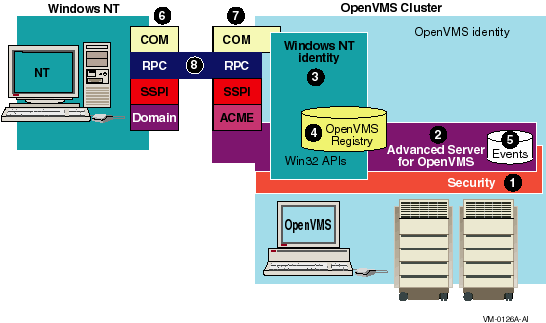
In Figure 3-1 the key pieces of the OpenVMS infrastructure are as follows:
- OpenVMS Cluster/OpenVMS identity
The large box on the right side of Figure 3-1 represents the OpenVMS system. Within this box you can see several other boxes labeled with numbers. The following list describes these numbered items: - Windows NT system
The smaller box on the left side of Figure 3-1 represents the Windows NT system.
- OpenVMS security
This is the standard OpenVMS security (login, authentication, ACLs, and so on) available with all OpenVMS systems. - Advanced Server for OpenVMS
The Advanced Server for OpenVMS provides authentication of Windows NT users to OpenVMS and provides a connection to the OpenVMS Registry for Windows NT users. - Windows NT identity/Win32 APIs
The OpenVMS Security, Advanced Server for OpenVMS, OpenVMS Registry, events logger, and Win32 APIs (COM APIs) all contribute to the creation of a Windows NT identity within the OpenVMS system. - OpenVMS Registry
The OpenVMS Registry, like the registry on Windows NT systems, allows you to store system, software, and hardware configuration information on OpenVMS. COM for OpenVMS uses the OpenVMS Registry to store information about COM applications. For detailed information about the OpenVMS Registry, see Part 2 of this document. - Events logger
Like the events logger on Windows NT systems, the events logger on OpenVMS records informational, warning, and error messages about COM events.
COM Version 1.0 for OpenVMS does not implement the full events logger. For more information, see Section 1.1.12. - Windows NT COM stack
On the Windows NT system, COM requests and responses pass through the COM, RPC, SSPI (security), and Domain layers. - OpenVMS COM stack
The OpenVMS system mirrors the Windows NT COM stack, with some additions. On the OpenVMS system, COM requests and responses pass through the COM, RPC, SSPI (security), ACME, and Advanced Server for OpenVMS layers. The ACME is an authentication mechanism that is new for OpenVMS Version 7.2.
COM Version 1.0 for OpenVMS does not implement the full COM stack on OpenVMS. COM Version 1.0 for OpenVMS is a nonsecure COM implementation, and uses only the COM and RPC layers. For more information, see Section 1.1.11. - Connection through RPC layer
The COM connection between the Windows NT system and OpenVMS is always through the RPC layer.
For developers, the COM for OpenVMS developer's kit provides a Microsoft Interface Definition Language (MIDL) compiler and C-style header files for application development. For more information about the OpenVMS MIDL compiler, see Section 3.4. COM for OpenVMS also provides a free run-time environment on OpenVMS Alpha for the deployment of COM for OpenVMS client and server applications.
You can find a complete description of Microsoft's COM, including protocol specifications and programming documentation, at the Microsoft COM website at the following location:
www.microsoft.com/com |
The COM for OpenVMS implementation is a subset of the full Microsoft COM implementation. For a complete list of the COM for OpenVMS APIs, supported interfaces, and implementation differences, see Appendix D.
While general interest in COM continues to grow, COM remains a
sophisticated technology. It is not aimed at the naive user, but rather
at skilled programmers, such as independent software vendors (ISVs) and
large management information system (MIS) shops.
3.2.1 How COM for OpenVMS Uses the OpenVMS Registry
COM for OpenVMS requires the OpenVMS Registry. Like its registry database counterpart on Windows NT systems, the OpenVMS Registry stores information about COM applications---specifically those COM applications running on OpenVMS. These COM for OpenVMS applications use the OpenVMS Registry to store CLSIDs (class IDs), startup information, security settings, and so on in the OpenVMS Registry database. COM for OpenVMS uses the Win32 APIs implemented on OpenVMS to read and write this information to the OpenVMS Registry.
COM for OpenVMS requires access to the OpenVMS Registry database. If
COM for OpenVMS cannot access the OpenVMS Registry, COM for OpenVMS will not
start. For more information about the OpenVMS Registry, see Chapter 7.
3.3 Using COM for OpenVMS
You can use COM for OpenVMS to do the following:
- Develop new COM for OpenVMS COM applications
- Encapsulate existing applications for use with COM for OpenVMS
The following sections discuss new application development and
encapsulation in more detail.
3.3.1 Developing New Applications
Your organization might use COM for OpenVMS to develop new applications under the following circumstances:
- You want to share data between an OpenVMS server and Windows NT clients in a two-tier client/server computing model.
- You want to share data and to place business logic in the middle
tier of a three-tier computing environment.
For example, you might have a Windows NT system as the client so you can take advantage of its graphical user interface. You could write business logic as a collection of COM objects on a middle-tier server; while the third-tier large-capacity, high-availability OpenVMS server provides database access. - You want to share data between one or more OpenVMS systems or between OpenVMS and other non-Windows systems using COM.
The advantages of using COM for OpenVMS include:
- COM for OpenVMS provides a good programming model for programmers with C++ and object-oriented programming skills.
- COM for OpenVMS provides multivendor interoperability. COM is a standard with implementations available on a number of platforms today, and ports for additional platforms are in development.
- The COM for OpenVMS run-time provides automated data marshaling and unmarshaling.
- COM provides OLE Automation services to support communications with Microsoft Visual Basic® applications. Visual Basic is a very popular programming environment for client/server computing.
- COM provides version support for components so you can upgrade applications over time without breaking existing environments.
See Chapter 6 and Appendix B for examples of developing
COM for OpenVMS applications.
3.3.2 Encapsulating Existing Applications
If you have monolithic applications written in procedural languages (such as Fortran and COBOL) with character-cell interfaces, you can put a COM "wrapper" or jacket around these applications to allow them either to run on new platforms or to remain on OpenVMS and run in a client/server environment.
The risk associated with completely reengineering some older applications is high. Many applications are large, complex, poorly documented, and not well understood by their current maintainers. Encapsulating a legacy application can be less risky than reengineering and can be the first step in a rewrite. Over time, pieces of the legacy application can be rewritten, while the older version of the application remains stable and available. Encapsulation also allows developers to reuse code, saving time and resources.
Disadvantages to encapsulation include more complex maintenance efforts and the inability to make changes to the underlying code. If the legacy application was unstable or hard to maintain, the encapsulated application will not be any better, and might be made worse because of the wrapper.
There are several layers of a traditional procedural application that you can encapsulate: the user interface (UI), the database, and the data manipulation routines.
- User interface
If you choose to encapsulate the user interface, the UI could be supported on some other platform (for example, from a graphical user interface [GUI] on a Windows NT system).
Encapsulating and moving the UI to the user's desktop can mean that the rest of the application remains on OpenVMS. Batch processing programs are well suited to user interface encapsulation. Applications that do screen management (for example, SMG or FMS) could have their older character-cell interface encapsulated using COM for OpenVMS, providing users access through newer Windows NT style dialog boxes. - Database
If you choose to encapsulate a database using COM for OpenVMS, the database could be accessed from parts of a distributed application running on other platforms. The advantage of this approach is that the programmer can keep the database on OpenVMS (a stable, 24x365 system), while the user interface and data access routines are on remote (and perhaps less reliable) systems. - Database manipulation routines
If you choose to encapsulate the database manipulation routines, the routines could be accessed from any other COM component in a heterogeneous computing environment.
Encapsulating an OpenVMS application using COM for OpenVMS means that you write a COM for OpenVMS server that talks to the application being encapsulated. The COM for OpenVMS server passes arguments to the application in the order and format that the application expects. The COM for OpenVMS server then intercepts the output from the application and directs it to the display device, user interface, or other routines.
| Next | Contents | Index |
|
Copyright © Compaq Computer Corporation 1999. All rights reserved. |
6539P.HTM
|